
Available to Organization Admin.
Appearance has two colors. They do different jobs and reach different surfaces, so it is worth setting them deliberately rather than matching them to each other.
Primary color
Used for primary buttons, links and active states across Leap, Sign-Only and e-mail. This is the color people notice most, because it marks the thing they are meant to click. The Documill default is #214997.
Header background
Applied to the Leap and Sign-Only headers only. Notification e-mails keep a neutral header regardless of what you set here. The default is #FFFFFF.
Change a color
-
Go to the Organization page and scroll to Branding.
-
In the Appearance panel, click Customize.
-
For Primary color, either click the swatch and pick a color, or type a hex value into the field.
-
Do the same for Header background.
-
Click Save.
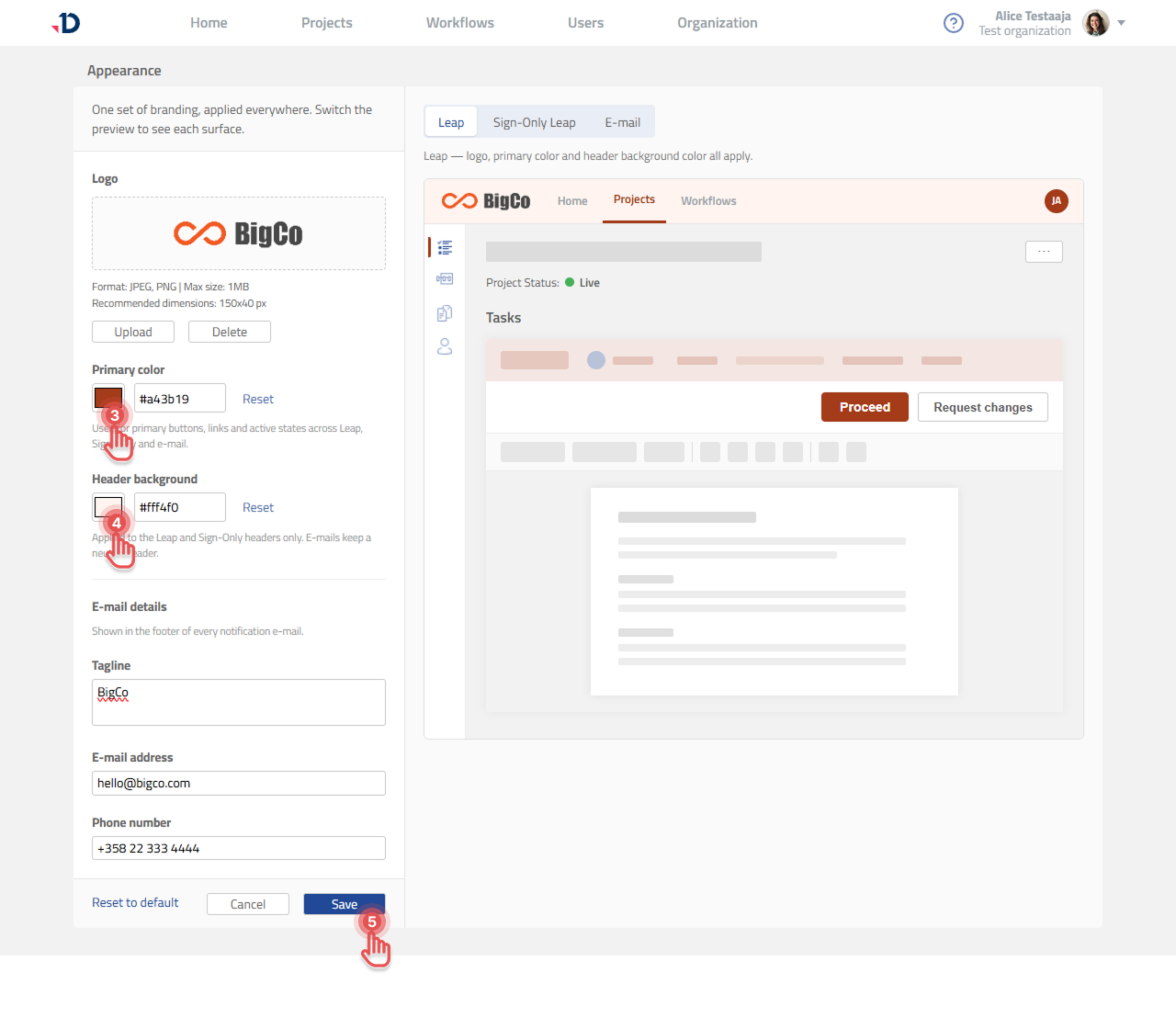
Undo one color without resetting everything
Each color has its own Reset link, which returns just that color to the Documill default. Use it in preference to Reset to default at the bottom of the editor, which also clears your logo and e-mail footer details. See Resetting Appearance to Default.
Check before you save
Switch between the Leap, Sign-Only Leap and E-mail preview tabs to see each surface with your colors applied. Two things are worth looking at specifically: whether button labels stay readable against your primary color, and whether your logo still reads clearly on your chosen header background.