
-
Available to Project Owner.
-
Available when the Project Owner belongs to multiple Groups.
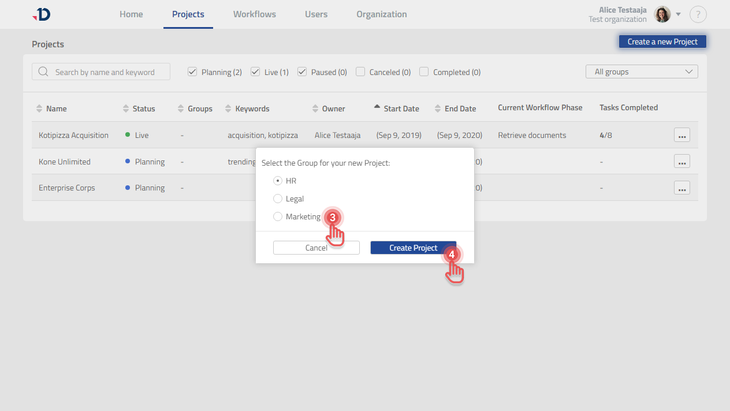
Assigning a Group during Project creation
-
Go to Home page or Projects page
-
Click [Create a new Project] button.
-
Under the dialog, select the Group which the new Project should belong to.
-
Click [Create Project] button.
Preview
Assigning a Group to an existing Project
-
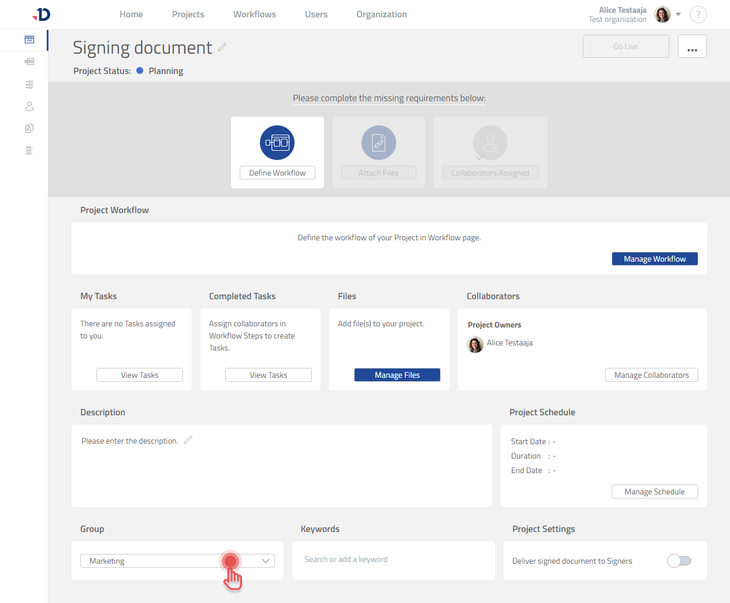
Go to Projects page.
-
Open the Project you wish to assign a Group to.
-
Under Project Dashboard page, scroll down if needed.
-
Click the [Group] dropdown button to select a new Group.
Preview
-
Project Owner who belongs to one Group automatically has their Projects in the same Group.
-
Project Owner who belongs to one Group cannot assign their Projects to another Group.
-
Project Owner can assign a Project to the same Groups where the Project Owner belongs to.
-
Quick Start Project is always private and cannot be assigned to a Group.