
In the Documill Generate & Automate Winter '25 package release (version 2.267.0), Documill introduced its latest user interface, UI v2. This new version delivers a wide range of performance improvements and security enhancements for customers. Any customers using version 2.267.0 or later of the package will be automatically upgraded to the new UI, provided they are using the default Visualforce page.
How to tell which version is being used
While the new UI v2 appears largely the same to end users, there are a few visible indicators of the change. The most noticeable difference is the underlying URL: UI v2 connects to Documill via https://dynamo-ui.documill.com, whereas the previous version (UI v1) uses https://dynamo-eu1.documill.com.
By default, this URL is configured in the Visualforce page DynamoFrame, which is included in the managed package.
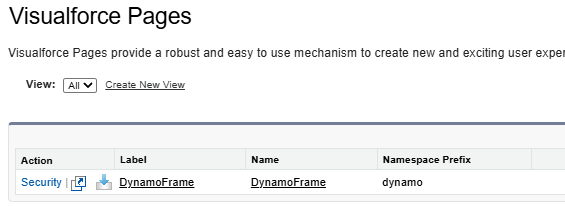
If a custom implementation is in use, or if a custom Visualforce page has been created, the URL must be manually updated within that Visualforce page to point to the new endpoint (https://dynamo-ui.documill.com).

The V2 request URL uses the following structure:
https://dynamo-ui.documill.com/start?id={!$CurrentPage.parameters.id}&templateID={!$CurrentPage.parameters.templateID}&oauthLoginURL={!DomainStr}"
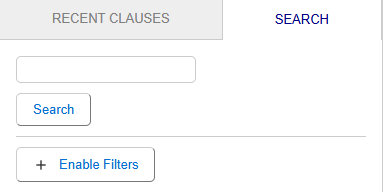
In cases where the Documill document editor is embedded directly within Salesforce, the URL may not be visible to users. In such scenarios, the Clause panel serves as a reliable indicator of the active version. UI v2 features a subtle visual refresh of the Clause panel. If the Clause panel matches the appearance shown below, the template is already using UI v2.
Testing UI V2
A template can be tested on the UI V2 version via the template builder. Once in the template builder, open a template for testing.
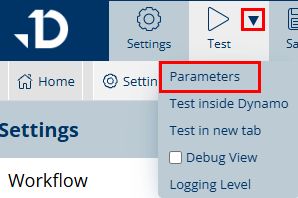
From the Test dropdown, select Parameters.
In the Parameters window, select a testing record and enable the UI v2 checbox.
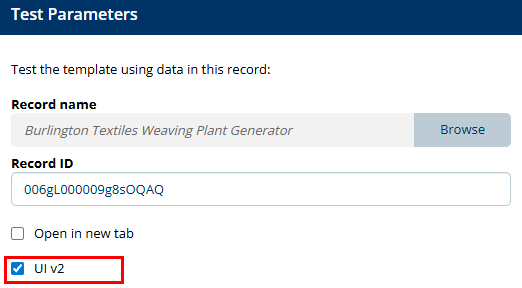
Click OK to confirm the change. Proceed with testing by clicking on the Test button.

After the upgrade, verify that your templates function as expected and that no error messages are displayed.
All existing templates created with previous versions remain fully compatible with UI v2. Should you encounter any unexpected behavior or errors, our support team will address them promptly. Please contact us at support@documill.com with details of the issue.
If no problems are observed, you may proceed to the next step: fully enabling and adopting UI v2 across your Salesforce organization.
Upgrading to UI V2
Before upgrading, it is recommended to test the template via the Template Builder and enabling the UI v2 from the test parameters.
When upgrading the Documill Generate & Automate managed package to version 2.267.0 or later, the included Lightning components are automatically upgraded to their latest versions, no additional action is required. The same applies to any custom buttons that use the package's standard DynamoFrame Visualforce page.
For custom implementations, manual modification of the request URL is necessary. The exact steps depend on your specific setup. In these cases, locate any request URL beginning with https://dynamo-eu1.documill.com and update it to the new endpoint: https://dynamo-ui.documill.com.
https://dynamo-ui.documill.com/start?id={!$CurrentPage.parameters.id}&templateID={!$CurrentPage.parameters.templateID}&oauthLoginURL={!DomainStr}"
Downgrading back to UI V1
In cases where the UI V2 version is not working as expected, it is possible to revert back to the UI V1 version with the use of custom settings introduced in the package version 2.267.0.
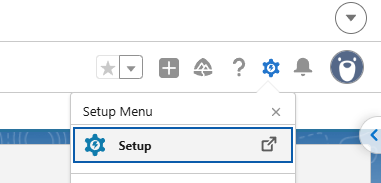
1. Within Salesforce, navigate to the Setup
-
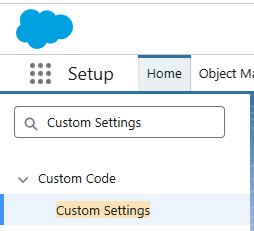
In the Home tab, search for Custom Settings.
-
In the Custom Settings list, Dynamo Settings should be available. If Dynamo Settings are not available, ensure that the package version is 2.267 or contact support@documill.com

-
On the left-hand side, click Manage. The Dynamo Settings should open. Click New.

-
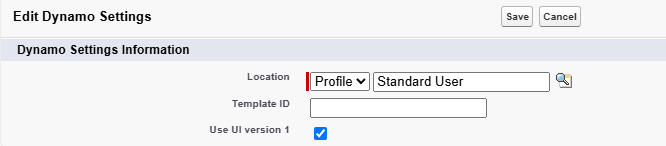
Select a profile and enable the checkbox Use UI version 1 and click Save
-
The default lightning components and VisualForce pages will now use the previous UI V1.
If the downgrade was necessary due to issues with using the new UI V2, please reach out to support@documill.com and assistance in migrating the template will be provided.