
Available to Salesforce Admin.
The Clause Library lets you store and manage clauses in Salesforce. Collaborators in Leap Projects can then add these clauses to documents while editing. You manage the clauses on the Documill Clause Library tab in the Leap app.
Before you start
-
The Documill Leap Salesforce app is connected to your Leap organization. See Connecting to a Leap Organization.
-
Leap has access to Salesforce through a connected user. See Giving your Leap Organization access to Salesforce.
Step 1: Assign the permission set to the connected user
In Documill Leap Setup Assistant, go to the step Assign Permission Set to Connected User and assign “Documill Leap Clause Admin” permission set to the connected user. See also Assigning Permission Set to Salesforce User.
Step 2: Turn on Clauses
-
In the Setup Assistant, go to (Optional) Enable additional features.
-
Turn on Access Clauses in Leap Projects.
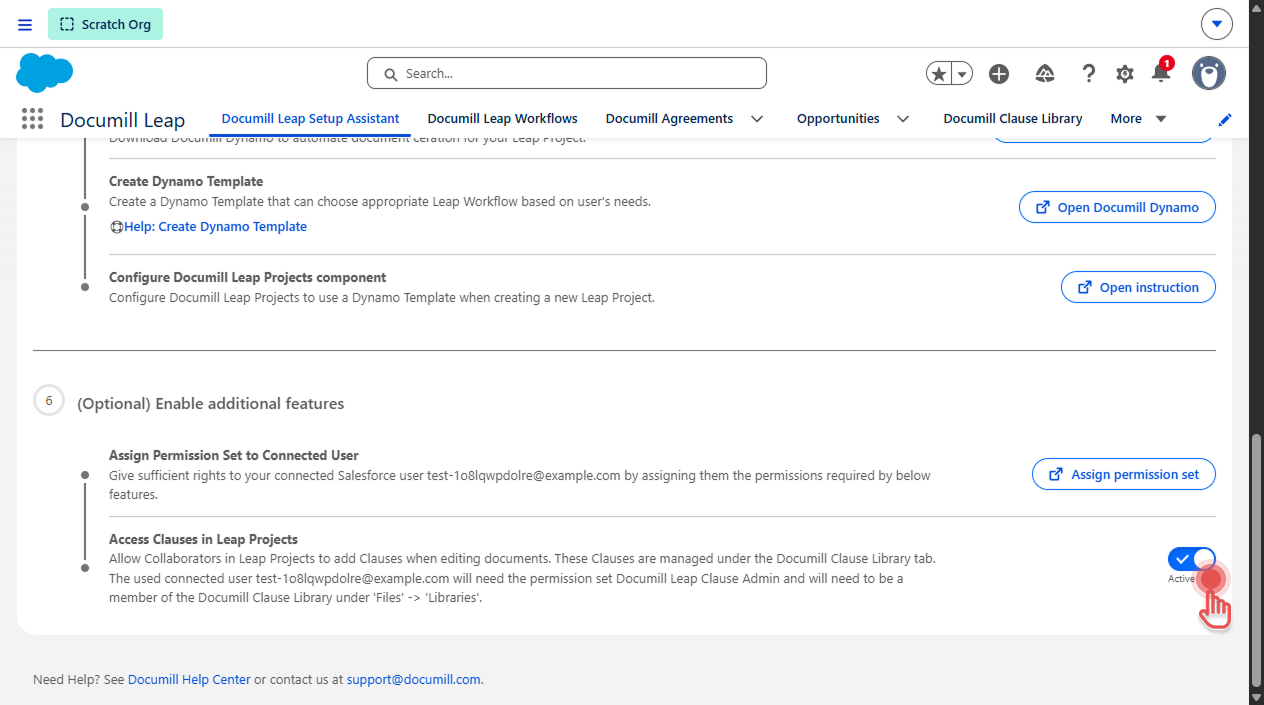
Leap then creates a library called Documill Clause Library under Files → Libraries, where the clause files are stored. The connected user becomes a member of it automatically.
If the Documill Clause Library already exists (for example because you connected a different user earlier), do the following:
-
Add the current connected user as a member:
Files → Libraries → Documill Clause Library → Manage Members. -
Then turn on the toggle.
Step 3: Give clause managers access
Each Salesforce user who will manage clauses needs:
-
The “Documill Leap Clause Admin” permission set. See Assigning Permission Set to Salesforce User.
-
Membership of the Documill Clause Library library (Files → Libraries → Documill Clause Library → Manage Members). Adding a public group as a member also works.
The Documill Clause Library tab is added to the Leap app automatically.
Troubleshooting
|
Message |
What to do |
|---|---|
|
You don’t have access to Clause Library |
Assign the user the “Documill Leap Clause Admin” permission set. |
|
Not connected to your Leap organization |
Connect the app to Leap. See Connecting to a Leap Organization |
|
You don’t have access to the Clause Library files |
Make sure Access Clauses in Leap Projects is turned on (step 2), and add the user as a member of the “Documill Clause Library” library (step 3). |